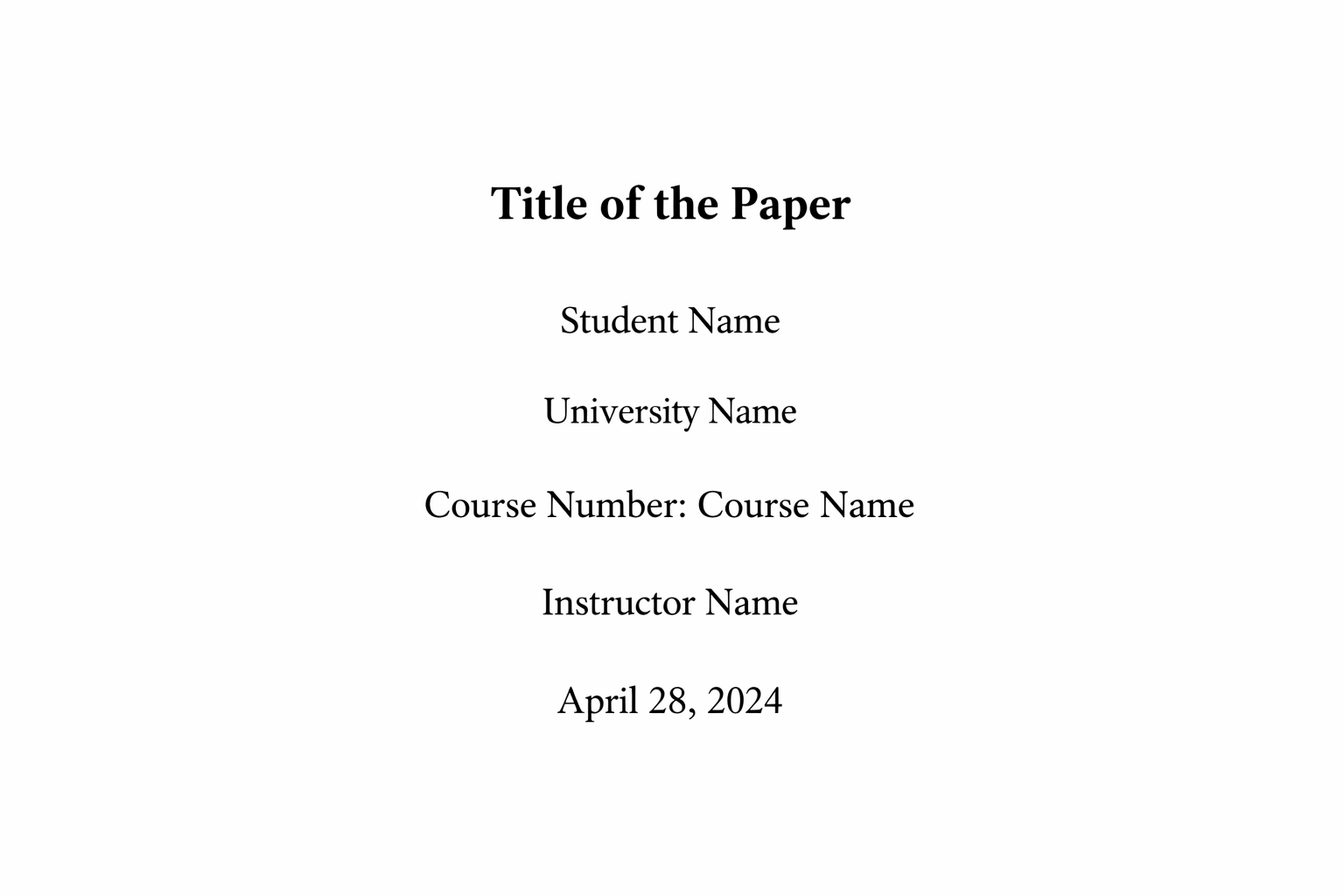
Knowing how to format an APA title page student paper correctly is one of the most important foundations of academic writing. In APA 7th edition, the title page format changed significantly from earlier versions, especially for student assignments. Many students lose easy formatting marks simply because they follow outdated guidelines or confuse student and professional paper requirements.
An APA title page is not decorative. It is a structured, standardized page that presents key information about your paper in a precise order and format. Universities expect strict adherence to APA guidelines, particularly in psychology, education, nursing, business, and social sciences. This guide explains exactly how to format an APA title page for a student paper step by step, ensuring your assignment meets current APA 7 requirements.
Student vs Professional APA Title Page: What Is the Difference?
Before learning how to format an APA title page student paper, you must understand that APA 7 distinguishes between student papers and professional papers. Most university assignments require the student version, which is simpler.
The key difference is that professional papers include a running head and author note, while student papers typically do not (unless your instructor specifically requests them).
| Element | Student Paper | Professional Paper |
|---|---|---|
| Running head | No | Yes |
| Author note | No | Yes |
| Page number | Yes | Yes |
If you are submitting coursework for a class, you almost always need the student version unless told otherwise.
Essential Elements of an APA Title Page Student Paper
To correctly format an APA title page student paper, you must include the following elements in this exact order:
- Paper title
- Your full name
- Institution name
- Course number and course name
- Instructor name
- Assignment due date
All elements must be:
- Centered
- Double-spaced
- Written in a standard font (e.g., 12-point Times New Roman, 11-point Calibri, 11-point Arial)
- Placed in the upper half of the page
The paper title should be bolded in APA 7 student papers.
Everything else on the title page should remain in regular font (not bold).
Step-by-Step: How to Format an APA Title Page Student Paper
Step 1: Insert the Page Number
The page number appears in the top right corner of the header. For student papers, only the page number is required — no running head label.
The title page is always page 1.
Step 2: Add the Title (Bold and Centered)
The title should be:
- Centered
- Bold
- Written in title case (major words capitalized)
- Placed about 3–4 lines from the top of the page
A strong APA title is concise and descriptive. It should clearly reflect your research focus without being vague or overly long.
Example:
The Impact of Social Media Use on Adolescent Academic Performance
Step 3: Add Your Name
On the next line, include your full name (first name, middle initial if desired, last name). Do not include titles such as “Student” or academic degrees.
Example:
Maria L. Thompson
Step 4: Add Institutional Affiliation
Below your name, write the full name of your university or college. Do not abbreviate unless your institution officially uses an abbreviation.
Example:
University of Manchester
Step 5: Include Course Information
On the next line, write the course number followed by the course name.
Example:
PSY201: Introduction to Cognitive Psychology
Step 6: Add Instructor Name
Write your instructor’s name exactly as provided in the syllabus.
Example:
Dr. James R. Patel
Step 7: Add the Due Date
The date should be written in full (Day Month Year format).
Example:
18 January 2026
Full Example Layout of an APA Title Page Student Paper
Below is how the title page should appear structurally (all centered and double-spaced):
| Line Order | Content |
|---|---|
| 1 | Paper Title (Bold) |
| 2 | Your Full Name |
| 3 | University Name |
| 4 | Course Number: Course Name |
| 5 | Instructor Name |
| 6 | Due Date |
This structure must be followed exactly to comply with APA 7 student paper requirements.
Formatting Rules Students Often Get Wrong
Even when students know how to format an APA title page student paper, small mistakes still occur. The most common errors include:
- Failing to bold the title.
- Adding a running head unnecessarily.
- Using single spacing instead of double spacing.
- Incorrect capitalization in the title.
- Adding extra decorative formatting.
APA formatting prioritizes clarity and consistency, not visual creativity.
Keep formatting simple, clean, and aligned with official APA standards.
Font, Margins, and Spacing Requirements
To properly format an APA title page student paper, you must also follow standard document settings:
- 1-inch margins on all sides
- Double spacing throughout
- Readable font (Times New Roman 12 pt, Arial 11 pt, Calibri 11 pt)
- Black text on white background
These formatting settings apply to the entire paper, not just the title page.
Why APA Title Page Formatting Matters for Grades
Many students underestimate formatting marks. Instructors often assess APA accuracy as part of the grading rubric. A properly formatted title page demonstrates attention to detail, professionalism, and understanding of academic conventions.
Correct formatting also signals that the rest of your paper is likely structured properly. In contrast, an incorrectly formatted title page may create a negative first impression before the reader even begins the main content.
Mastering How to Format an APA Title Page Student Paper
Learning how to format an APA title page student paper correctly is straightforward once you understand the structure. Include the page number, bold the centered title, list your academic details in order, and maintain consistent spacing and formatting throughout. Avoid unnecessary running heads unless instructed otherwise.
Precision in APA formatting reflects academic discipline and professionalism. When your title page is formatted correctly, you begin your assignment with confidence and credibility — exactly what examiners expect in university-level work.


Comments